Tutorial
Some Agent Work Outlives the HTTP Request — Durable Agents (Part 6)
Forty-page scrape. Human approval that takes a day. A cron job at 3am. Part 6: background tasks, crash-proof durable agents, and heartbeats — machinery for work that doesn't fit in one request.
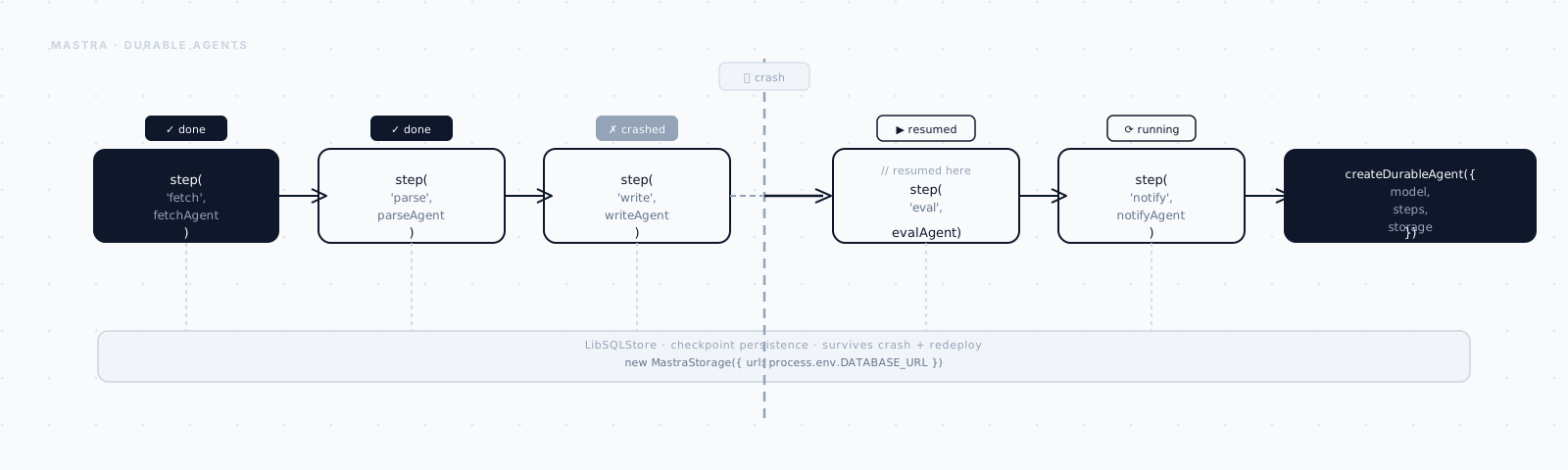
Picture the last time you kicked off an agent to do something that actually takes a while — not "answer this question," but "go do this thing." Scrape a stack of pages. Draft a long report. Wait on someone's approval.
You watched the terminal for a bit, got bored, and switched tabs.
Then something interrupted it. Your laptop went to sleep. A deploy rolled the server out from under it. Or you just closed the tab, because nobody keeps a tab open for four minutes.
The work didn't pause and wait for you to come back. It just stopped — gone, along with everything it had done so far.
Every agent in this series so far has quietly assumed that never happens. You
call stream(), tokens come back, you're done in seconds — the whole life of
the agent fits inside one request. But a real agent platform accumulates work
that doesn't fit that shape:
- a research task that reads forty sources and takes four minutes,
- an approval step that stalls until a human clicks "yes" tomorrow morning,
- a nightly job that summarizes yesterday's tickets on a schedule.
None of those survive being tied to an HTTP request. The connection times out, the serverless function gets killed, the user closes the tab — and the work dies with it. This part is about the machinery Mastra gives you for work that has to outlive the request that started it.
Three problems, three tools
It's easy to blur these three together — they all involve an agent doing something without a person staring at the screen. But they answer three different questions, and reaching for the wrong one costs you later. Let's separate them up front:
I'll take them in that order, starting with the smallest problem.
Background tasks — don't block on the slow part
Say one tool in your agent's loop is the genuinely slow part of a run — a scrape, a big export, a model-heavy summarization step. If you block the whole response on it, the agent feels frozen. The user just watches a cursor blink for however long the tool takes.
Background tasks fix that. A tool can hand back control immediately and keep working off to the side, while the agent moves on with the conversation.
You turn the subsystem on at the Mastra instance level:
import { Mastra } from "@mastra/core";

export const mastra = new Mastra({
  agents: { research: researchAgent },
  backgroundTasks: {
    enabled: true,
    globalConcurrency: 20,     // at most 20 background tasks running at once
    perAgentConcurrency: 5,    // ...and at most 5 from any single agent
    backpressure: "queue",     // over the limit? queue, don't drop
    defaultTimeoutMs: 120_000,
  },
});
Those concurrency numbers matter more than they look. Without them, a burst of
requests could kick off dozens of scrapes at once and take down whatever
they're hitting. globalConcurrency and perAgentConcurrency are the guardrails.
Turning the subsystem on doesn't background anything by itself, though. You still have to say which tool is allowed to run this way:
export const deepScrape = createTool({
  id: "deep-scrape",
  description: "Scrape and summarize an entire documentation site.",
  inputSchema: z.object({ url: z.string() }),
  outputSchema: z.object({ taskId: z.string() }),
  background: {
    enabled: true,
    timeoutMs: 300_000, // this one legitimately needs five minutes
    maxRetries: 2,
  },
  execute: async ({ url }) => {
    // ...long crawl... the task runs off the request path
    return { taskId: url };
  },
});
Now the agent can kick off the scrape, keep talking to the user, and let the task finish in the background.
There's one wrinkle worth knowing about. Sometimes you don't want the agent to
just return after one turn — you want it to keep looping until all its
background work has actually drained. That's what untilIdle is for:
// Keep looping until the agent AND its background tasks are all idle.
const stream = await agent.stream("Scrape all three doc sites and compare them.", {
  untilIdle: true,
});
And because the task queue lives independently of any one request, you can reach into it from anywhere else — a status panel, a health check, or to resume a task after a restart:
const task = mastra.backgroundTaskManager?.getTask(taskId);
const all = mastra.backgroundTaskManager?.listTasks();
await mastra.backgroundTaskManager?.resume(taskId);
backpressure: "queue" is the safe default — excess tasks wait for a slot
instead of failing outright. There are other modes for when "eventually" beats
"never," but start with queueing. Only reach for the alternatives once you've
watched what real traffic actually does to your limits.
That covers slow. It doesn't cover interrupted — and that's a genuinely different failure mode.
Durable agents — survive the crash
A background task assumes the process stays alive while it works in the corner. But what if the process itself doesn't make it? A deploy goes out mid-run. The container OOMs. The whole box restarts.
An ordinary agent has no answer to that. It loses the conversation, the half-finished tool calls, the plan — everything, because none of it was ever written down anywhere durable. A durable agent is the fix: it persists its state at every step, so it can pick up exactly where it stopped.
You don't rebuild the agent to get this. You wrap the one you already have:
import { createDurableAgent } from "@mastra/core/agent/durable";
import { researchAgent } from "./mastra/agents";

const durable = createDurableAgent({ agent: researchAgent });

// stream() now hands back a runId — the handle to a run that outlives this process.
const { output, runId, cleanup } = await durable.stream(
  "Produce a competitive analysis of the top 5 vector databases."
);

console.log("run started:", runId);
for await (const chunk of output.fullStream) {
  // render as usual...
}
cleanup();
Notice what came back alongside the stream: a runId. That's the whole point
of this pattern. If the process dies at chunk 400 of 900, you don't start over
from zero. You reattach to the run that's still going, in whatever process
picks it back up:
// In a fresh process, after a crash or deploy:
const live = durable.observe(runId); // re-attach to the same run's stream
for await (const chunk of live) {
  render(chunk);
}
The same mechanism that survives a crash also survives a wait. That's what makes human-in-the-loop possible: the agent can suspend itself, sit there for however long it takes a person to respond — minutes, or until tomorrow morning — and resume with their input once it arrives, even in a completely different process.
// The run suspended itself waiting on an approval. Hours later:
await durable.resume(runId, { approved: true, note: "ship it" });createDurableAgent is the batteries-included starting point, and for most
apps it's as far as you'll need to go. If your orchestration needs get
heavier, you can back the same durable model with a dedicated workflow
engine — createInngestAgent from @mastra/inngest runs it on Inngest's
infrastructure instead.
Surviving a crash or a long wait solves the interrupted case. But there's a third case neither of these two touches: work that never had a person waiting on it in the first place.
Heartbeats — run on a schedule, no user present
Sometimes there's no request to survive, because there was never a user to send one. You want an agent to just wake up on its own — summarize yesterday's support tickets at 6am, sweep for anomalies every hour — with nobody around to kick it off. That's what heartbeats are for.
await mastra.schedules.create({
  agentId: "research",
  cron: "@daily",                 // nicknames work: @hourly, @daily, @weekly
  timezone: "America/New_York",
  prompt: "Summarize yesterday's support tickets and flag any recurring issue.",
});
Each firing runs the agent with that prompt exactly as if a user had typed it in. The one choice you have to make is what happens to the conversation between firings.
A heartbeat can be threadless — a clean context every single time, which is right for an independent daily digest that doesn't need to remember yesterday. Or it can be threaded, where each run appends to one ongoing conversation, and the agent remembers what it reported last time. Reach for threaded when the schedule is really one long task sampled over time; threadless when each run stands completely on its own.
A heartbeat runs with nobody watching, so a bad tool call has no one there to catch it before it does damage. Give scheduled agents the narrowest tool set that gets the job done, and lean on the evals from Part 7 to keep them honest — an unattended agent is exactly the one you most want automated checks on.
That's the last of the three. But there's a fourth pattern, close cousin to running unattended, that's worth knowing before we wrap up.
Bonus: give the agent a goal, not just a prompt
Everything so far still assumes you're prompting the agent — a heartbeat just automates when the prompt fires. Sometimes you don't want to prompt it turn-by-turn at all. You want to hand it an objective and let it keep working until that objective is actually met.
That's what Mastra's goal does, with a judge deciding when "done" is really
done:
const agent = new Agent({
  name: "researcher",
  instructions: "You research topics thoroughly.",
  model: openai("gpt-4o"),
  goal: {
    judge: openai("gpt-4o"),   // decides whether the goal is satisfied
    maxRuns: 8,                // hard stop so it can't loop forever
  },
});

// Set the objective for the agent on a specific thread:
await agent.setObjective("Cover the last 12 months of vector-DB benchmarks.", {
  threadId: "research-thread",
});
Here's the loop underneath it: the agent runs, the judge scores whether the
objective is actually met, and based on that it either stops or goes
again — up to maxRuns, so it can't spin forever chasing an objective it'll
never quite satisfy.
Think of it as the autonomous cousin of stopWhen from earlier in this series.
stopWhen stops on a count or a tool call — something mechanical. goal
stops when a model judges the outcome good enough. Different kind of stop
condition, same instinct: never let an agent run unbounded.
What outlives the request
Everything in this part exists to break one assumption: that an agent's whole life fits inside a single HTTP request.
Background tasks move the slow part of a tool call off the response path, so the agent doesn't feel frozen while it waits. Durable agents checkpoint state at every step, so a run survives a crash or a wait of any length. Heartbeats run agents on a schedule with nobody present to kick them off. And goals let an agent keep working toward an objective across many runs instead of one.
Put together, that's the machinery for an agent that doesn't just answer a question — it keeps working after you've stopped watching.
There's one question left, though, and it's the one that decides whether any of this is actually safe to ship: is the agent good? An agent that survives crashes and runs every night unattended is a liability the moment its answers are wrong. Next, in Part 7: Evals & Scorers, I put numbers on quality and wire them into CI.