Tutorial
Your Agent Is Still Guessing — Mastra RAG With Citations (Part 5)
A confident answer with no source is still a hallucination waiting to happen. Part 5: chunk, embed, store, query — wire a retrieval pipeline under your agent so it answers from your documents, with citations.
Picture the agent from Part 4. Tokens streaming in as they're generated. Tools narrating themselves while they run. A progress checklist ticking across the screen, live. On stage, it looks finished.
Then someone actually uses it.
Not a demo question. A real one — something specific to your company: an internal runbook, last week's changelog, a refund policy that lives in a PDF the model has never seen. Ask about that, and watch what happens.
> What's our refund window for annual plans?

I don't have specific information about your refund policy, but
typically SaaS companies offer 14–30 day refund windows...
Read that answer again. It's fluent. It's plausible. It's also completely made up.
"Typically" is the tell. The model doesn't know your refund policy — it's pattern-matching against every SaaS refund policy it saw during training and handing you the average. Confident and wrong is the worst combination an agent can produce, because it doesn't look wrong.
The fix isn't a bigger model. A bigger model still doesn't know your refund policy. The fix is to put the actual text in front of the model before it answers — to give it something real to read instead of something to guess at.
That's retrieval-augmented generation, RAG for short, and Mastra has the whole pipeline built in.
The series so far
- Agents — the loop, tools, memory.
- Workflows — orchestration with guarantees.
- The Harness — the runtime that hosts it.
- Streaming — get the work to a UI live.
- RAG (you're here) — answer from real documents, not vibes.
The shape of the whole thing
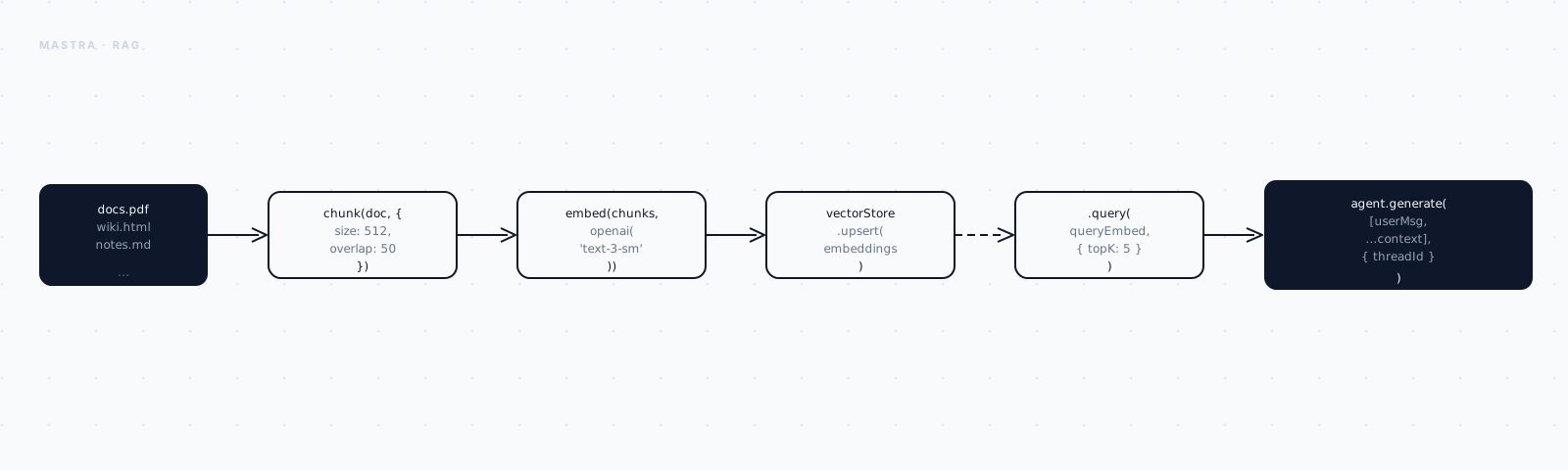
Before any code, it's worth seeing the two phases RAG splits into — they run at completely different times.
One phase happens once, or whenever your docs change. You take raw text, cut it into chunks, turn each chunk into a vector, and store it. Call that ingestion.
The other phase happens on every single question a user asks. Embed the question, find the nearest chunks, hand them to the agent. Call that retrieval.
Everything below is just filling in those four boxes, one at a time, and then adding the retrieval step that reads back out of the store.
Step 1 — Chunking with MDocument
Start with the first box: chunking.
You can't hand the model your whole handbook as one giant vector — cram a hundred pages into a single embedding and you lose all the local meaning; it becomes an average of everything, useful for nothing specific. You also can't go the other way and embed one word at a time — now you've lost all the context, and a word alone means almost nothing.
So you split the text into passages: big enough to mean something on their own, small enough to stay specific. That's a chunk.
Mastra's MDocument does the splitting, and it isn't naive about it — it
understands structure. Markdown headings, code fences, paragraph breaks. It
won't slice a sentence in half just because the character count ran out.
import { MDocument } from "@mastra/rag";

const doc = MDocument.fromText(runbookText);
That gives Mastra something it can reason about. The actual splitting happens in one call:
const chunks = await doc.chunk({
  strategy: "recursive", // split on structure, then fall back to size
  size: 512,             // target tokens per chunk
  overlap: 50,           // repeat a little across boundaries so context isn't lost
});

console.log(`${chunks.length} chunks`);
console.log(chunks[0].text.slice(0, 80));37 chunks
## Refunds. Annual plans are eligible for a full refund within 30 daysThree fields, three decisions. strategy: "recursive" splits on structure
first — headings, paragraphs — and only falls back to raw size when it has
to. size: 512 is the target length of each chunk, in tokens.
overlap: 50 is the one that's easy to skim past, so slow down on it. Without
overlap, a fact that straddles a chunk boundary — "the refund window is"
landing at the end of one chunk, "30 days" starting the next — gets split
across two vectors, and neither one retrieves cleanly on its own. overlap: 50 repeats the trailing 50 tokens into the start of the next chunk, so the
boundary stops being a cliff the meaning can fall off of.
strategy: "recursive" is the sane default for prose and mixed content. Mastra
also ships strategies tuned for markdown, HTML, JSON, and code — reach for those
when your source is structured and you want chunks to respect that structure
(one chunk per function, per section, etc.).
You now have 37 little passages of meaning. None of them are searchable yet — they're still just text. That's the next box.
Step 2 — Embedding the chunks
A vector store doesn't search by keyword. It searches by closeness in meaning, and "closeness" only means something once your chunks are numbers.
That's an embedding: the chunk's meaning, expressed as a list of numbers, where two chunks about similar things end up close together in that space, and two unrelated chunks end up far apart.
import { embedMany } from "ai";
import { openai } from "@ai-sdk/openai";

const { embeddings } = await embedMany({
  model: openai.embedding("text-embedding-3-small"),
  values: chunks.map((c) => c.text),
});

// One vector per chunk, same order in as out.
console.log(embeddings.length, "×", embeddings[0].length);37 × 1536Thirty-seven chunks in, thirty-seven vectors out, each one 1536 numbers long.
embedMany — from the ai package, the same AI SDK the rest of this series
has been using — runs the whole batch through the embedding model in one
call, which is a lot cheaper and faster than looping over chunks one at a
time.
One thing to hold onto, because it comes back in Step 4: retrieval quality lives and dies by the embedding model. Whatever model you use to embed these document chunks, use the exact same model to embed the user's question later. Mix models and you're comparing vectors from two different spaces — the numbers won't mean the same thing, and similarity search quietly stops working.
You've got vectors now. They still need somewhere to live.
Step 3 — Storing vectors in PgVector
Mastra speaks to about a dozen vector stores through one interface. I'm
reaching for PgVector here, because it's just Postgres with the pgvector
extension turned on — if you already run Postgres, this is zero new
infrastructure.
First, connect to it:
import { PgVector } from "@mastra/pg";

const store = new PgVector({
  id: "docs",
  connectionString: process.env.POSTGRES_URL!,
});
Then create an index to hold this particular set of vectors — you do this once, not on every ingestion run:
// Create the index once; dimension must match the embedding model's output.
await store.createIndex({ indexName: "runbook", dimension: 1536 });
That dimension: 1536 isn't a random number — it has to match the length of
the vectors your embedding model produces. Change embedding models later and
you'll need a new index.
Now write the vectors in:
await store.upsert({
  indexName: "runbook",
  vectors: embeddings,
  metadata: chunks.map((c) => ({ text: c.text })), // keep the text to return later
});

console.log("indexed", embeddings.length, "chunks");
That metadata field is the part people forget, and it's worth pausing on. A
vector store finds you the nearest vectors — but a vector is just 1536
floats, meaningless on its own. You need the original text to hand back to
the model when there's a hit. So you stash text (and anything else worth
keeping — a source URL, a section name, a last-updated date) in metadata at
upsert time, and it rides along with every search result from here on.
Ingestion is done. 37 chunks, 37 vectors, all sitting in Postgres with their original text attached. Now for the part that happens every time someone actually asks a question.
Step 4 — Retrieving for a question
Same idea as ingestion, run in reverse, on a single piece of text: the question.
Connect to the same store and index you just built:
import { embed } from "ai";
import { openai } from "@ai-sdk/openai";
import { PgVector } from "@mastra/pg";

const store = new PgVector({ id: "docs", connectionString: process.env.POSTGRES_URL! });
Then embed the question — with the same model you used for the chunks, because that's the rule from Step 2 coming back around:
const { embedding } = await embed({
  model: openai.embedding("text-embedding-3-small"), // same model as ingestion
  value: "What's our refund window for annual plans?",
});
And ask the store for whichever chunks are closest to it:
const results = await store.query({
  indexName: "runbook",
  queryVector: embedding,
  topK: 3, // the 3 nearest chunks
});

for (const r of results) {
  console.log(r.score.toFixed(3), "→", r.metadata?.text.slice(0, 60));
}0.612 → ## Refunds. Annual plans are eligible for a full refund within 30 days
0.418 → Monthly plans follow a pro-rated policy after the first 7 days
0.377 → Cancellations take effect at the end of the current billing periodThere it is. Score 0.612, top of the list — the exact refund clause the
agent was missing back at the start of this article.
topK: 3 is a small number doing a real balancing act. Too few, and you risk
missing the one passage that actually answers the question. Too many, and you
drown that passage in noise while burning context tokens on chunks that don't
help. Three to five is a reasonable starting band — tune it against your own
real questions once you have some.
You can now retrieve the right passage for a question. The only piece missing is wiring that into something the agent actually calls.
Step 5 — Putting retrieval under the agent
You could take those three passages and paste them straight into the prompt yourself, every time. But that defeats the point of having an agent at all — the whole idea, going back to Part 1, is that the agent decides when it needs to go look something up.
So retrieval becomes a tool. Same pattern as every other tool in this series, just backed by your vector store instead of an API.
Start with its shape — what it's called, what it takes in, what it returns:
import { createTool } from "@mastra/core/tools";
import { embed } from "ai";
import { openai } from "@ai-sdk/openai";
import { z } from "zod";
import { store } from "../store";

export const searchDocs = createTool({
  id: "search-docs",
  description: "Search the product documentation for relevant passages.",
  inputSchema: z.object({ query: z.string() }),
  outputSchema: z.object({
    passages: z.array(z.object({ text: z.string(), score: z.number() })),
  }),
A query string in, a list of scored passages out. Nothing surprising there —
it's the same shape as retrieve.ts above, just declared as a contract
instead of run as a script.
The execute function is that script, dropped in as the tool's body:
  execute: async ({ query }) => {
    const { embedding } = await embed({
      model: openai.embedding("text-embedding-3-small"),
      value: query,
    });
    const results = await store.query({
      indexName: "runbook",
      queryVector: embedding,
      topK: 4,
    });
    return {
      passages: results.map((r) => ({ text: r.metadata!.text, score: r.score })),
    };
  },
});
Embed the query, hit the store, map the results into the shape the schema promised. Now the agent has something to call:
import { Agent } from "@mastra/core/agent";
import { openai } from "@ai-sdk/openai";
import { searchDocs } from "../tools/search-docs";

export const supportAgent = new Agent({
  name: "support",
  instructions: `You answer questions about our product.
    ALWAYS call search-docs before answering a factual question.
    Answer only from the returned passages. If they don't contain the
    answer, say so — never guess. Quote the passage you used.`,
  model: openai("gpt-4o"),
  tools: { searchDocs },
});
Don't skim past the instructions — they're doing the real work. "Answer only from the returned passages" and "never guess" are the two lines that turn a plausible-sounding model back into a grounded one. The retrieval tool gives the agent access to the truth; the instructions are what make it actually use that access instead of falling back on training data out of habit.
Ask it the same question from the top of this article, and this is what comes back:
[calling search-docs]
[got result from search-docs]
Annual plans are eligible for a full refund within 30 days of purchase.
After that window, cancellations take effect at the end of the current
billing period.

Source: "Refunds. Annual plans are eligible for a full refund within 30 days…"
No "typically." It searched, it found the clause, it answered from the clause, and it told you exactly where the answer came from.
And because retrieval is just a tool call, it rides on the same fullStream
from Part 4 — that [calling search-docs] line
renders live in the UI, so the person asking actually watches the agent go
look something up before it answers.
What you actually built
The agent didn't get smarter. It got sourced. Same loop, same streaming, same harness as the earlier parts in this series — all that changed is it now has somewhere to look things up:
MDocument.chunk()— cut documents into meaningful, overlapping passages.embedMany()— turn a batch of chunks into vectors in one call.PgVector.upsert()— store vectors with the original text in metadata.PgVector.query()— find the nearest chunks for a question.- a retrieval tool — so the agent decides when to look, and cites what it found.
The distance between "typically 14–30 days" and "30 days, here's the clause" is the entire distance between a demo and something a support team is willing to put in front of a real customer.
That's the five-part core of building with Mastra: an agent, workflows around it, a harness to host it, streaming to show its work, and RAG to ground it. From here, the interesting problems stop being about capability and start being operational — keeping long-running agents alive, and proving they're actually any good. Those are next.