Tutorial
Build a Mastra Agent From Scratch — Tools, Memory, and the Loop (Part 1)
Every new agent project starts with the same hand-rolled loop. Part 1 of the Mastra series: define a typed agent, wire tools with createTool, and add memory so it survives the next turn — without rebuilding the plumbing again.
Every new agent project starts with the same hand-rolled loop — and ends with the same edge cases you already solved last time.
I've built agents from scratch before. The loop. The message list. The stop condition. All of it wired by hand, one project at a time.
It's the best way to actually understand what an agent is. You stop treating it like magic the moment you've written the retry logic yourself.
But once you understand it, hand-rolling the same plumbing for every new project gets old fast. You end up rebuilding the same loop, the same message bookkeeping, the same edge cases — over and over, for no new insight.
That's the gap Mastra fills.
Mastra is a TypeScript framework that gives you those primitives — agents, tools, memory, workflows, and a runtime to host them — without hiding how they work. This series walks through it in seven parts, and they build on each other:
This series
- Agents (you're here) — define an agent, give it tools, add memory.
- Workflows — orchestrate multi-step logic.
- The Harness — the runtime that hosts it all.
- Streaming — get the work to a UI live.
- RAG — answer from real documents.
- Durable agents — survive crashes, run in the background.
- Evals — prove the agent is actually good.
Everything here uses Mastra 1.46+ (@mastra/core). I'll keep the code
runnable and minimal, and link the official docs as I go.
What an agent is in Mastra
In Mastra, an agent is just a configured instance of the Agent class.
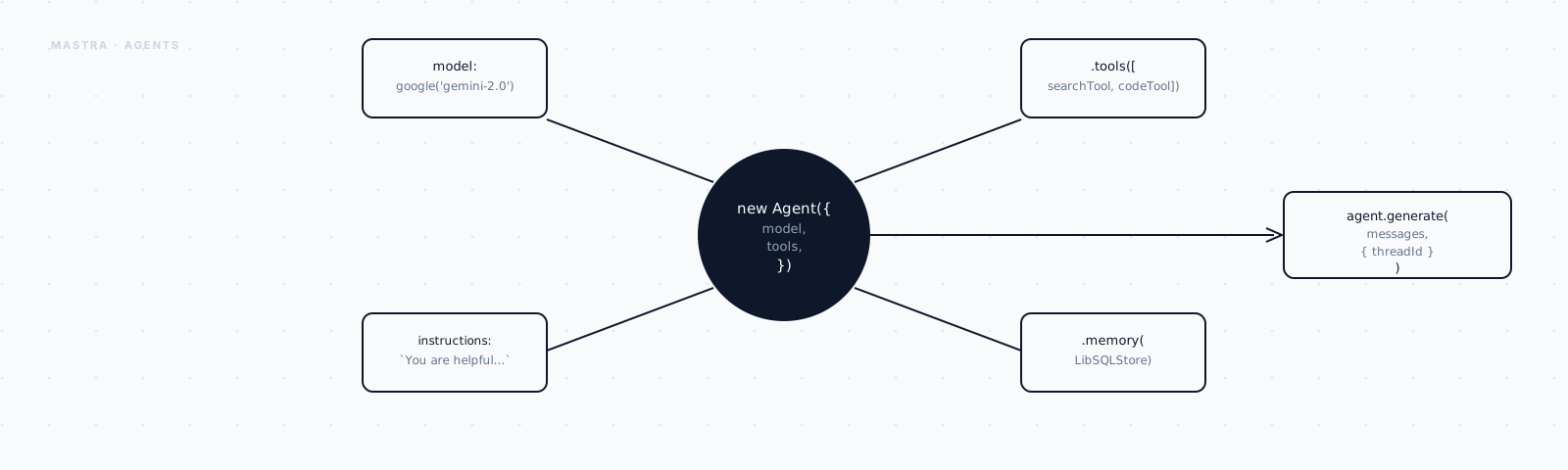
You hand it instructions, a model, and — optionally — tools, memory, and more. Mastra owns the loop underneath. You only describe the behavior.
Four things you write, one thing you don't. Let's build the smallest version that actually works, and add the rest one piece at a time.
Step 1: Define an agent
An agent needs three things to exist: a name, instructions, and a model. That's it. Nothing else is required yet.
import { Agent } from "@mastra/core/agent";

export const assistant = new Agent({
  name: "Assistant",
  instructions: "You are a concise, friendly assistant. Prefer short answers.",
  model: "openai/gpt-5.5",
});
Two of those fields are worth sitting with for a second before you move on.
instructions is your system prompt. It looks like a small string in a
config object, but it's the single most important field here — it's where
the agent's personality and rules actually live. Write it for the model
reading it, not for the next engineer skimming the file.
model is just a string, in provider/model-id form. Mastra resolves the
actual provider behind that string for you, which means swapping models
later is a one-line change, not a rewrite.
An agent by itself doesn't run anything, though. To actually talk to it,
register it with a Mastra instance — the root object that holds everything
your app exposes:
import { Mastra } from "@mastra/core";
import { assistant } from "../agents/assistant";

export const mastra = new Mastra({
  agents: { assistant },
});
Now pull the agent back out and talk to it:
import { mastra } from "./mastra";

const agent = mastra.getAgent("assistant");

const result = await agent.generate("What's the capital of Portugal?");
console.log(result.text); // "Lisbon."
That generate call is the whole agent loop, condensed into one method
call. Right now, with no tools attached, it's really just a single model
call wearing a bigger name.
Give it a tool, and that same method starts doing real work.
Step 2: Give it a tool
A tool is just a function the model can call — described well enough that the model knows when to reach for it.
That description is doing more work than it looks like. The model can't read your code. It decides whether to call your tool based purely on the sentence you give it, so "Get the current weather for a given city" earns its keep in a way that "weather fn" never could.
Mastra's createTool wraps your function with a schema on both sides — one
for what goes in, one for what comes back out:
import { createTool } from "@mastra/core/tools";
import { z } from "zod";

export const weatherTool = createTool({
  id: "get-weather",
  description: "Get the current weather for a given city.",
  inputSchema: z.object({
    city: z.string().describe("The city name, e.g. 'Lisbon'"),
  }),
  outputSchema: z.object({
    city: z.string(),
    celsius: z.number(),
  }),
  execute: async ({ city }) => {
    // A real tool hits an API. We'll fake it.
    const temps: Record<string, number> = { Lisbon: 22, Oslo: 4, Cairo: 35 };
    return { city, celsius: temps[city] ?? 18 };
  },
});
Three more pieces here, and they're the same in every agent framework I've used.
inputSchema is a contract, not a suggestion. The model has to produce
arguments that match it, and Mastra validates them with Zod before your
execute function ever runs. Bad input just never reaches your code.
outputSchema does the same thing on the way back out. It gives whatever
comes next — the model, or a later step in a pipeline — a typed shape it
can actually rely on instead of guessing at the return value.
execute is the only part that's just ordinary TypeScript. Everything
around it exists to describe it well enough that the model uses it
correctly.
Attach the tool to the agent by passing a tools map:
import { Agent } from "@mastra/core/agent";
import { weatherTool } from "../tools/weather";

export const assistant = new Agent({
  name: "Assistant",
  instructions: "You are a helpful assistant. Use tools when they help.",
  model: "openai/gpt-5.5",
  tools: { weatherTool },
});
Now ask it something that actually needs the tool:
const result = await agent.generate("Should I pack a coat for Oslo?");
console.log(result.text);
// "It's about 4°C in Oslo, so yes — bring a coat."
Watch what just happened underneath that one call.
You never wrote that sequence. The model planned the order — call the tool, read the result, then answer — and Mastra just drove it. That's the actual payoff of letting the framework own the loop: you describe capabilities, and something else figures out the control flow.
Spend your effort on tool id, description, and parameter names. The model
can't see your implementation — only the schema. Half of "prompt engineering"
for agents is really just naming things well.
An agent with a tool can act. It still can't remember doing so.
Step 3: Add memory
Ask that same agent a follow-up question right now, and it won't have the
faintest idea what you're talking about. Every generate call so far has
been amnesiac — the moment it answers, it forgets the conversation ever
happened.
To hold an actual conversation, the agent needs memory: somewhere to store what was said, and pull it back up on the next turn.
Mastra splits that into two pieces — a memory module, and a storage backend sitting behind it that actually persists the data. For local development, LibSQL — plain SQLite under the hood — is the simplest backend you can reach for:
const memory = new Memory({
  storage: new LibSQLStore({ url: "file:./memory.db" }),
});
That's the concept on its own. Wire it into the agent the same way you wired in the tool:
import { Agent } from "@mastra/core/agent";
import { Memory } from "@mastra/memory";
import { LibSQLStore } from "@mastra/libsql";
import { weatherTool } from "../tools/weather";

export const assistant = new Agent({
  name: "Assistant",
  instructions: "You are a helpful assistant. Use tools when they help.",
  model: "openai/gpt-5.5",
  tools: { weatherTool },
  memory: new Memory({
    storage: new LibSQLStore({ url: "file:./memory.db" }),
  }),
});
Having memory attached isn't quite enough on its own, though — Mastra still needs to know whose memory it's loading.
It scopes that by thread and resource. A thread is one conversation. A resource is usually one user. You pass both when you call the agent, and Mastra handles loading the prior messages and saving the new ones for you:
const memoryScope = {
  memory: { thread: "trip-planning", resource: "user-42" },
};

await agent.generate("What's the weather in Cairo?", memoryScope);

// Later — same thread — the agent still has the context:
const result = await agent.generate("Is that warmer than Oslo?", memoryScope);
console.log(result.text);
// "Yes — Cairo is about 35°C versus Oslo's 4°C."
Look closely at that second call. "Is that warmer than Oslo?" only makes sense if "that" still points at Cairo — and it does, because the first turn's messages were persisted to the thread and replayed back in on the second.
Memory is per-thread on purpose. If two users share a thread/resource, they'll see each other's history. Scope threads to a conversation and resources to a user, and nothing leaks between them.
That's the load-bearing idea: a thread, a resource, a storage backend behind it. Mastra's memory actually goes a lot further than replaying the last N messages — it supports working memory, semantic recall, and memory processors for trimming long histories. But all of that is a refinement on top of the model above, not a replacement for it.
What you've got
In three small steps you built a real agent:
- an Agent with instructions and a model,
- a typed tool via
createToolthat the model calls on its own, - memory that gives it continuity across turns.
That's a complete, useful agent. But a single agent is still just a loop around a model. The interesting systems come from orchestrating logic — running steps in sequence, branching on results, looping until done — with guarantees an agent loop alone can't give you.
That's Part 2: Workflows, where I build multi-step pipelines and then hand control between workflows and agents.